CISP 301 - Store Checkout Console App (C++)
Console program that collects item prices and prints a purchase summary (total, count, min/max, average).
CISP 301 - Final Project
overviewAbout the class
CISP 301 focused on programming fundamentals using C++. The class emphasized problem solving, structured logic, and turning ideas into working code.
Goal
Learn how to think like a programmer: break problems into steps, design a solution, then implement it in code.
What I learned
- - Control flow: conditionals and loops
- - User input handling and basic validation patterns
- - Debugging and testing programs
- - Planning with pseudocode before writing code
Project
A store checkout program that prompts for item prices until the user enters -1. It then
prints a summary including item count, total cost, least expensive item, most expensive item, and
average
price.
How It Works
logic- Prompt the user for an item price.
- If the price is
-1, stop collecting items. - Otherwise add the price to the running total and increment the item count.
- Track minimum and maximum values as input is collected.
- After input ends, calculate the average and print the final summary.
Screenshots
preview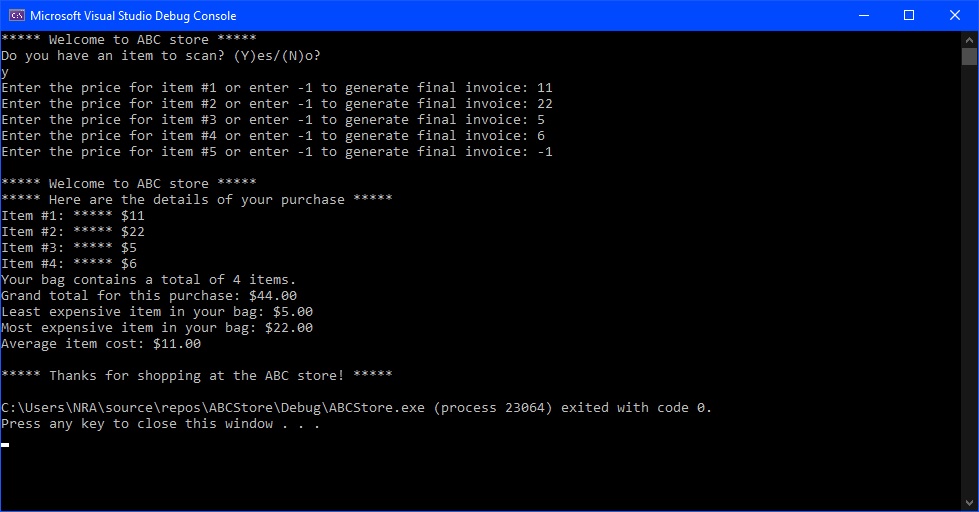
Pseudocode
designI wrote pseudocode first to plan the flow before implementing it in C++.
Pseudocode
Declare Count as integer
Declare TotalCost as float
Declare Least as float
Set Least = 1000
Declare Most as float
Set Most = 0
Declare Avg as float

Main
Declare Choice as character
Write "***** Welcome to the ABC store *****"
Write "Do you have items to scan? (Y)es/(N)o?"
Input Choice
If (Choice == 'y' or Choice == 'Y') Then
  Call Input
  Call Output
End If

Input
Declare Cost as float
Set Count = 1
Open "PurchaseData.txt" for output as PurchaseData
Write "Enter the cost for item #" + Count + " or enter -1 to generate final invoice: "
Input Cost
While (Cost != -1)
  Write "Item #" + Count + ": ***** $" + Cost
  TotalCost = TotalCost + Cost
  If (Cost < Least) Then
    Set Least = Cost
  End If
  If (Cost > Most) Then
    Set Most = Cost
  End If
  Count = Count + 1
  Write "Enter the cost for item #" + Count + " or enter -1 to generate final invoice: "
  Input Cost
End While
Set Avg = TotalCost / Count
Write "Your bag contains a total of " + Count + " items."
Write "Grand total for this purchase is: " + TotalCost
Write "The least expensive item in your bag cost: " + Least
Write "The most expensive item in your bag cost: " + Most
Write "The average item cost for this purchase is: " + Avg
Close PurchaseData

Output
Write "***** Welcome to the ABC store *****"
Write "***** Here are the details of your purchase *****"
Open "PurchaseData.txt" for input as PurchaseData
While NOT EOF (PurchaseData)
  Read record
  Write record
End While
Close PurchaseData
Write "***** Thanks for shopping at the ABC store! *****"
C++ Source
implementationTranslated my pseudocode into C++ and here we have the full source code for the console checkout program.
#include<iostream>
#include<fstream>
#include<string>
#include<iomanip>
using namespace std;

fstream PurchaseData;
float TotalCost = 0;
float Least = 1000;
float Most = 0;
float Avg = 0;
int Count = 1;

void Input();
void Output();

int main() {
	char Choice = 'a';
	cout << "***** Welcome to ABC store *****" << endl;
	cout << "Do you have an item to scan? (Y)es/(N)o?" << endl;
	cin >> Choice;
	if (Choice == 'y' || Choice == 'Y') {
		Input();
		Output();
	}
	if (Choice == 'n' || Choice == 'N') {
		cout << "Thanks for shopping at the ABC store!";
	}
	return 0;
}

void Input() {
	float Cost;
	PurchaseData.open("PurchaseData.txt", ios::out);
	cout << "Enter the price for item #" << Count << " or enter -1 to generate final invoice: ";
	cin >> Cost;
	while (Cost != -1) {
		PurchaseData << "Item #" << Count << ": ***** $" << Cost << endl;
		TotalCost = TotalCost + Cost;
		if (Cost < Least) {
			Least = Cost;
		}
		if (Cost > Most) {
			Most = Cost;
		}
		Count = Count + 1;
		cout << "Enter the price for item #" << Count << " or enter -1 to generate final invoice: ";
		cin >> Cost;
	}
	Count = Count - 1;
	Avg = TotalCost / Count;
	PurchaseData << "Your bag contains a total of " << Count << " items." << endl;
	PurchaseData << "Grand total for this purchase: $" << fixed << setprecision(2) << TotalCost << endl;
	PurchaseData << "Least expensive item in your bag: $" << fixed << setprecision(2) << Least << endl;
	PurchaseData << "Most expensive item in your bag: $" << fixed << setprecision(2) << Most << endl;
	PurchaseData << "Average item cost: $" << fixed << setprecision(2) << Avg << endl;
	PurchaseData.close();
}

void Output() {
	cout << endl << "***** Welcome to ABC store *****" << endl;
	cout << "***** Here are the details of your purchase *****" << endl;
	PurchaseData.open("PurchaseData.txt", ios::in);
	string record;
	while (!PurchaseData.eof()) {
		getline(PurchaseData, record);
		cout << record << endl;
	}
	PurchaseData.close();
	cout << "***** Thanks for shopping at the ABC store! *****" << endl;
}
Key Snippets
why it mattersSome important snippets from the source code and how they work.
while (Cost != -1) {
while (Cost != -1) is the sentinel condition: it keeps accepting prices until the user
enters -1.
TotalCost = TotalCost + Cost;
TotalCost = TotalCost + Cost; updates the running total on every item.
if (Cost < Least) Least = Cost;This line tracks the cheapest item so the program can report the minimum price at the end.
Files
downloadsPossible Improvements
next steps- - Add stronger input validation (non-numeric input, negative prices, etc.).
- - Support item names and quantities, then print a more receipt-like output.
- - Export results to a file (CSV/JSON) instead of console-only output.